
Picture this common problem in your daily work. You sit down at your busy desk. You have many tools to plug into your computer. For instance, you have a printer, a mouse, and a heavy hard drive.However, your PC simply lacks enough ports. In our modern world, computers are getting incredibly thin. Consequently, they lose many traditional connection spots. To fix this frustrating physical limit, a reliable USB Hub is your absolute best friend. Of course, in a huge global company, an IT expert might use a smart USBManager Server to control thousands of tools far away.
That software is truly amazing for giant networks. But right now, you just need to fix the computer right in front of you. Therefore, we must talk about finding the perfect local hardware. Today, let us sit down together. We will use simple words and short sentences. We will learn exactly how to pick the right connection tool for your daily needs.
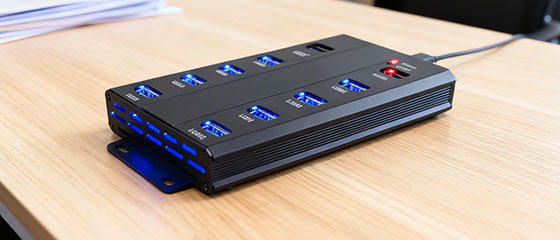
Why a Strong Power Supply Matters for Your USB Hub
First, we must talk about pure energy. When you shop, you face two main choices. You can buy a cheap, unpowered tool. Alternatively, you can invest in a strong, powered USB Hub.
A cheap tool steals energy directly from your computer’s motherboard. Think of it like a very thin water pipe. If you plug in just one small mouse, the water flows fine. The tool works okay.
However, what happens when you plug in heavy cameras, phones, and hard drives? The thin pipe simply bursts. The power drops rapidly. As a result, your connected USB devices will suddenly crash. You might even lose your important work files.
In contrast, a powered device comes with its very own strong power supply. It pulls fresh, heavy energy straight from the wall socket. Then, it safely and fairly shares that energy to every single port.
Consequently, you can use many heavy tools at the exact same time. The hardware does not panic. Everything stays cool, calm, and totally stable. Therefore, for true peace of mind, choosing independent power is always the smartest move.
Speed Limits and Checking Your USB Hub Ports
Next, we must closely examine the speed. Speed is the true king of modern digital work. You should never buy a USB Hub just because it looks shiny or costs less.
Instead, you must carefully check the connection protocol. Are you still using an old, slow USB 2.0 connection? If so, your daily work will be very painful. Waiting for big files to move is like riding a rusty old bicycle. It takes forever.
Today, you absolutely need at least the USB 3.0 standard for your hardware. This modern standard gives you a very fast data transfer rate. It is exactly like driving a fast race car on an empty highway.
Furthermore, you must carefully count your available USB ports. Do you only need four ports for basic office work? Or do you realistically need ten ports for a giant editing station? Checking these small details carefully will save you a massive amount of time later.
Moving Beyond the Desk: Sharing USB Devices
Now, let us open our eyes a bit wider. Sometimes, your vital tools are not sitting on your desk. Sometimes, you work in a huge, dirty factory building.
For example, you might own very expensive software USB dongles. You certainly cannot leave them in an unsafe factory room. Someone might steal them. They might also break from heavy vibrations.
Therefore, you desperately need a safe way for sharing USB devices. At this specific point, you need a very special tool. You need an Ethernet USB device server.
This magical metal box bridges the gap. It takes your physical tools and places them securely on the network. In addition, you might even need several USB device servers to cover a massive office building. This clever setup keeps everything locked and safe inside a clean server room.
Reaching Remote Clients and Virtual Machines
How does this network magic actually work? It is quite simple to understand. The hardware strictly follows standard tcp IP rules.
Because of this common language, you can easily access your USB devices over a network. It truly does not matter how far away you sit. Furthermore, for the absolute best speed, you should always connect it to a fast gigabit Ethernet line.
A wide data highway prevents any bad traffic jams. As a result, your remote clients can use the tools instantly. There is absolutely zero delay. They feel like the tool is plugged right into their laptop.
Moreover, the modern world uses the cloud a lot. Many smart companies put their main operating systems inside invisible virtual machines. These cloud systems totally lack physical ports.
However, by using advanced USB over IP technology, you solve this problem completely. You get perfect, seamless remote USB access from anywhere in the world.
Using a Device Manager to Manage USB Traffic
Finally, we must talk about central control. Good hardware is totally useless without good software. When you have many connected tools everywhere, you cannot just guess what is happening.
You absolutely need a clear, simple, and powerful device manager. This software dashboard acts exactly like a master band leader. It helps you see every single connection clearly. It shows you who is using what tool.
With excellent software, you can easily manage USB connections across your entire corporate building. Everything becomes incredibly neat, highly safe, and very simple to control.
Well, my friend, our digital learning journey ends here for today. Let us quickly review our core lessons. You must pick hardware with a strong wall plug. You must strictly demand fast transfer speeds.
Also, you must plan for your future network needs. By following these easy, logical steps, you will easily find the perfect USB Hub for your trusty PC. Consequently, your daily work will become smooth, fast, and totally stress-free.
