
Banking USB Token Remote Access & Management
Centralize corporate banking security tokens. Enable controlled remote access and physical-button confirmation on compatible models.
USB Manager combines dedicated USB Server hardware, access permissions and audit records to help finance teams manage banking USB tokens across offices, LAN and VPN networks.
* Remote physical-button operation is available on dedicated models and compatible tokens only.
Challenges of Traditional Corporate Banking USB Token Management
Physical bank tokens remain essential in many corporate online banking workflows, but distributing and operating them can slow finance teams down.
01
Limited Remote Access
Tokens attached to a specific PC are inconvenient for authorized finance staff working in another office or location.
02
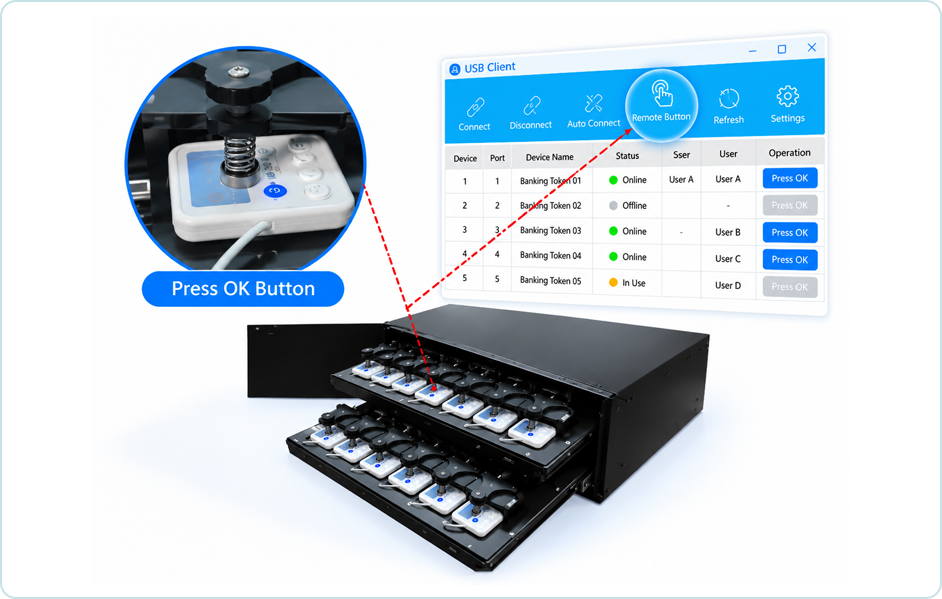
Physical Confirmation Buttons
Some bank security tokens require a person to press OK or Confirm for individual transactions.
03
Multiple Banks & Accounts
Managing tokens across accounts, banks, departments and branches adds inventory and allocation complexity.
04
Security & Audit Requirements
Moving devices between people can increase the risk of loss, unauthorized handling and poor activity traceability.
How to Access Banking USB Tokens Remotely Over IP
Connect supported corporate banking USB tokens to a dedicated hardware USB Server in a controlled location. Authorized staff use a supported USB Client to connect to an assigned token through an appropriately secured network.
- Centralize physical tokens in a managed location
- Use LAN, VPN or approved routed network connections
- Apply user authorization and access policies
- Review device activity and connection records
- Enable remote OK/Confirm operation on compatible dedicated models
The network connection provides remote access to the physical USB token; it does not bypass bank authentication, transaction approval or token security controls.
Centralized Banking USB Token Server
Dedicated Hardware USB Token Server
—— SECURED LAN / VPN / IP NETWORK ——
Diagram is conceptual, not a photograph of a specific USB Server model.
Three Steps to Centralized Banking USB Token Access
01
Connect Banking Tokens
Install compatible USB security tokens in a dedicated hardware USB Server at a secure site.
02
Configure Secure Access
Connect the USB Server to the enterprise network and assign authorized users, tokens and access policies.
03
Connect & Approve
Authorized staff access assigned tokens remotely. On compatible dedicated models, they can operate the physical OK/Confirm button when required.
Remote OK / Confirm Button Control for Banking USB Tokens
Some corporate banking tokens require a physical button press during login or transaction approval. Selected USB Manager banking token hardware supports remote operation of that button for compatible token designs.
- Keep the physical token in a centralized location
- Allow designated operators to initiate supported remote button actions
- Reduce repeated trips to the token storage site
- Combine button operations with user permissions and audit procedures
Compatibility note: This is a model-specific mechanical or hardware function, not a universal feature of all 4-, 24- or 48-port USB Servers. Bank token shape, button location and bank-side policies must be checked before deployment.
Banking USB Token Remote Access Applications
01
Centralized Token Inventory
Keep multiple bank tokens together in a controlled, easier-to-administer location.
02
Remote Finance Operations
Provide controlled access to authorized finance users working from different locations.
03
Less Manual Handling
Reduce physical movement of USB tokens and repetitive local interactions where remote controls are supported.
04
Access Visibility & Auditing
Use permissions, connection monitoring and available audit records to support internal governance.
Banking USB Token Remote Access Applications
Corporate Online Banking
Manage USB security tokens used for multiple corporate bank accounts and authorized online banking sessions.
Finance & Treasury Teams
Support approved payment and transaction workflows that depend on physical bank tokens.
Multi-Branch Enterprises
Centralize banking token resources while enabling controlled access across distributed offices.
Finance RPA Integration
Use supported interfaces for automated token connect/disconnect operations in approved RPA workflows.
Hardware USB Over IP Designed for Enterprise Token Management
Unlike a basic USB hub or a software-only sharing setup that depends on a host PC, USB Manager uses dedicated network-connected hardware and centralized USB access tools.
- Dedicated hardware USB Server architecture
- Remote access to assigned USB banking tokens
- User permissions and device activity monitoring
- Compatible-model remote button confirmation
- Options for managing multiple devices and sites
A practical approach for finance IT teams
Deploy physical banking tokens where they can be protected and administered. Connect authorized staff across managed networks without relocating the tokens.
Confirm banking platform requirements and organizational approval controls independently.
Banking USB Token Remote Access FAQ
What is a banking USB token?
A banking USB token is a physical authentication device used by some corporate banking systems for identity verification, digital certificates or transaction authorization.
Can a corporate banking USB token be accessed remotely?
Compatible tokens can be connected to a hardware USB Server and accessed from authorized computers over a managed IP network using a supported USB Client. The bank’s own authentication and security requirements still apply.
How does banking USB token access over Ethernet work?
The physical token plugs into a hardware USB Server connected to the network. An authorized USB Client establishes a remote USB connection so supported banking software can interact with the token.
Can USB Manager press the OK or Confirm button remotely?
Selected dedicated banking token models support remote physical-button operation for compatible token shapes and mechanisms. This must be verified for the exact bank token.
Does remote button control automatically approve payments?
No. It provides a way to operate a supported physical button. It does not replace authorized human approval, banking application checks, transaction review or internal controls.
Can finance teams access tokens through a VPN?
LAN and appropriately secured VPN or routed-network deployments may be used when network access, client compatibility and organizational policies allow.
Can banking USB tokens work in virtual machines?
Some supported virtualized environments can access remote USB tokens through a compatible guest operating system and USB Client. Check the bank software, drivers, hypervisor and network configuration.
Can multiple employees use the same banking USB token simultaneously?
Normally one physical token is assigned to one active USB client connection at a time. Multiple authorized staff can access it at different times, subject to bank rules and internal access policies.
Can USB Manager integrate with finance RPA workflows?
Supported interfaces can be used to connect or disconnect designated USB tokens as part of approved automation. Payment approval and security checks must remain governed by bank and enterprise policies.
What information should I provide for compatibility assessment?
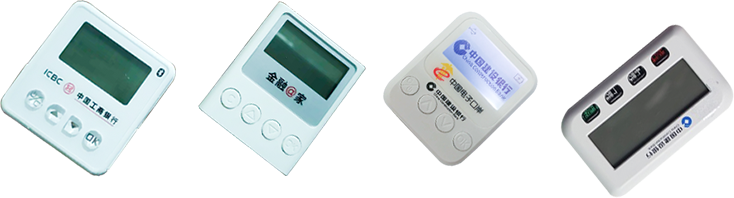
Share the bank and token model, photos of the physical device and button, banking software, operating system, number of tokens, intended network topology and remote-button requirements.
Centralize Banking Tokens Without Compromising Access Control
Tell us which banking USB tokens you use, how many devices you need to manage and whether remote OK/Confirm button control is required. We can help assess hardware options and compatibility.
