
Remote work and virtualization have become the backbone of modern business. But there’s one stubborn challenge: connecting physical USB devices to virtual machines or remote computers as if they were right on your desk. That’s where USB Network Gate shines, and when paired with the ChilliSky USB Server, the experience is smooth, fast, and secure.

Virtual Machines Need USB Network Gate for Real Device Access
Virtual machines (VMs) let us run multiple operating systems on a single piece of hardware—fantastic for testing, development, or consolidating servers. Yet a VM can’t simply reach out and grab a USB dongle or other physical USB devices by itself. Think of it like a chef trying to taste a dish through a TV screen. Whether it’s license USB dongles, industrial controllers, or specialized lab gear, the VM needs a bridge to the real device. USB Network Gate is that bridge, and the ChilliSky USB Server provides the reliable hardware backbone.
How USB Network Gate Works in a Virtual Environment
USB Network Gate creates a secure USB over IP tunnel. Install it on the host machine that’s physically connected to the USB device—this could be a workstation, a dedicated server, or even a compact ethernet USB device server. Once configured, the dongle or other connected USB devices appear in the VM’s Device Manager as if they’re plugged into a local USB port. Remote clients can now access scanners, printers, or even a full USB hub of equipment with no extra drivers or complicated network tweaks.
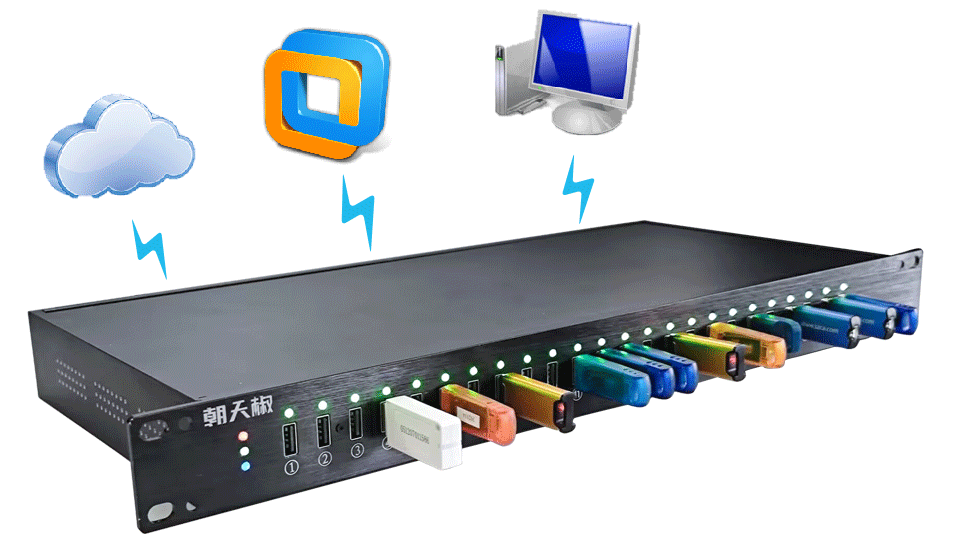
Pairing USB Network Gate with the ChilliSky USB Server takes this further. The ChilliSky unit acts as a powerful USB device server with gigabit ethernet support and stable power supply. It can host multiple USB 3.0 and USB 2.0 devices simultaneously, letting you share USB devices across the LAN, WAN, or cloud without sacrificing speed or stability.
Setting Up: Step-by-Step
1. Connect Devices to ChilliSky USB Server
Plug your USB dongles, external drives, or other hardware into the ChilliSky’s USB ports. Its gigabit ethernet interface ensures high-speed data transfer and low latency.
2. Install USB Network Gate on the Host and VM
Install the software on the computer or virtual machine that needs access and on the host that’s physically connected to the ChilliSky.
3. Configure the Connection
Use USB Network Gate to locate the remote USB device over TCP/IP. A few clicks and the device appears in the VM’s device manager as if it’s locally attached.
4. Manage and Monitor
Need to add more devices later? The ChilliSky hardware and USB Network Gate make it easy to manage USB sessions, monitor data transfer, and grant or revoke access for different remote clients.
Security and Performance Benefits
Security is critical when you’re transmitting USB devices over a network. USB Network Gate encrypts every connection and supports password protection, while ChilliSky USB Server adds detailed session logs and user controls. Together they provide enterprise-level safeguards, ensuring that only authorized remote clients can use the devices. Performance is equally strong—optimized protocols keep response times nearly identical to direct USB connections, even during heavy data transfer.
Ideal for Remote Teams
For remote or hybrid teams, this setup is a game changer. Designers can access license-protected software dongles from home. IT staff can manage USB hardware for testing across multiple virtual machines without swapping cables. Engineers can run industrial controllers or lab instruments as if they’re on-site. And if your team grows, simply add more USB ports or a second USB hub to the ChilliSky USB Server—scaling is seamless.
Final Thoughts on USB Network Gate and ChilliSky USB Server
In a world where remote work and virtualization dominate, the combination of USB Network Gate and ChilliSky USB Server is the practical answer to a tricky problem. Whether you’re sharing USB 3.0 devices with distant colleagues, connecting critical USB dongles to a VM, or ensuring fast, secure USB over ip connections for a global team, this duo delivers. Set it up once, and every virtual machine and remote client can work as if the devices were right beside them—no more juggling cables or shipping hardware across the world.
