
Industrial USB Over IP & Remote Instrument Access
Connect USB Test Equipment Over Ethernet, LAN & VPN Networks
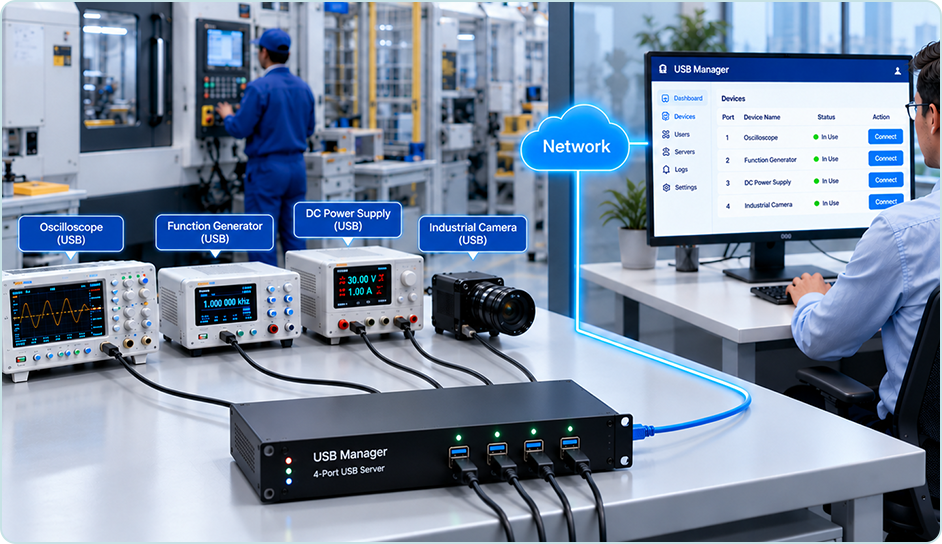
USB Manager provides hardware-based USB over IP for remote access to compatible industrial instruments, oscilloscopes, measurement devices and laboratory equipment. Keep USB-connected test equipment at the industrial site while authorized engineers access its USB interface from office PCs and supported remote workstations over the network.
· Remote USB · AccessCentralized · ManagementControlled Sharing
Challenges of Traditional USB Instrument Management
Direct USB connections can limit how engineering and laboratory teams deploy, access and share specialized equipment.
Limited Physical Access
Instruments are often connected to a nearby computer, making access from another room, laboratory or factory area inconvenient.
Shared Equipment Access
Specialized instruments are costly. Multiple engineers or departments may need controlled, scheduled access to the same device.
Remote Monitoring & Operation
Modern laboratories and production environments need flexible access without keeping an operator beside every instrument.
Complex Equipment Deployment
Moving instruments or reconnecting them to different computers adds setup time, maintenance work and operational complexity.
Remote USB Instrument Access Over Ethernet and IP Networks
Connect compatible USB instruments to a dedicated USB Server at the laboratory or factory, then access their USB interface over LAN or VPN using the required client software and instrument drivers. This hardware USB over Ethernet architecture can support remote measurement, configuration and data transfer where the instrument software, USB protocol and network conditions permit.
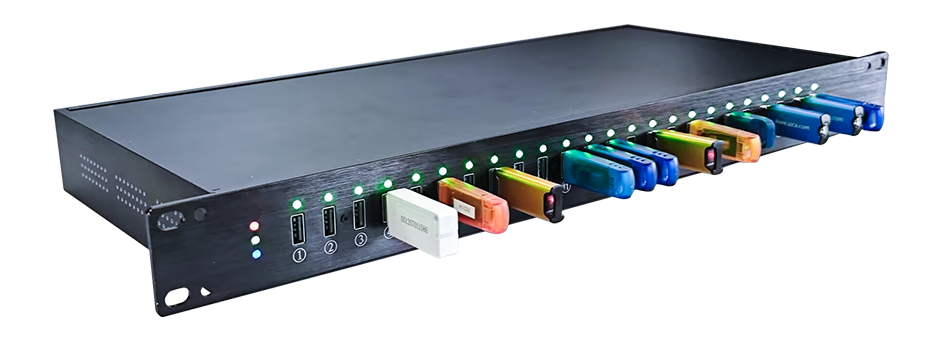
- Connect USB instruments to a dedicated hardware USB Server
- Access equipment from authorized computers across LAN or VPN networks
- Centralize USB device deployment and user permissions
- Support controlled, sequential sharing between engineers and departments
Typical device categories include measurement instruments, testing equipment, laboratory devices, data acquisition hardware and compatible industrial controllers.
Lab Workstation
Engineer / Researcher
→
LAN / VPN
IP Network
→
USB Server
Dedicated Hardware
↓
Centralized USB Instrument Connection
Illustrative connection architecture. Device compatibility and remote-control functions depend on USB protocol, drivers, application software and network conditions.
How to Connect Industrial USB Instruments Over Ethernet
Extend a compatible instrument’s USB connection to an authorized remote computer without physically moving the device.
01
Connect the USB Instrument
Plug the instrument’s USB interface into an available front USB port on the hardware USB Server at the industrial site.
02
Connect the USB Server to the Network
Connect the server to your Ethernet network and configure authorized access over LAN or an appropriately secured VPN.
03
Access the Instrument Remotely
Use the USB client on the remote workstation to connect to the USB device, then operate it through the compatible vendor driver and control software.
Compatibility first: Remote USB access does not replace instrument drivers, required local safety procedures or the vendor’s control software. Time-sensitive streaming and specialized USB protocols should be tested under the actual network conditions.
How to Connect Industrial USB Instruments Over Ethernet
Extend a compatible instrument’s USB connection to an authorized remote computer without physically moving the device.
01
USB Over IP for Industrial Equipment
Extend access to compatible USB-connected measurement, testing, data acquisition and industrial devices across the network.
02
Remote Laboratory Instrument Access
Allow researchers and engineers to connect to lab equipment from designated workstations without physically moving the instruments.
03
Centralized Industrial Device Management
Keep multiple USB instruments in a controlled location while assigning authorized access to engineers and departments.
Make Industrial USB Equipment Easier to Access and Manage
A network-based USB architecture can reduce unnecessary device movement and simplify how specialized instruments are shared, maintained and accessed.
Practical deployment note: USB over IP extends USB connectivity; it does not replace the instrument’s drivers, control application, or required safety and on-site operating procedures.
Improve Equipment Utilization
Let authorized teams use shared instruments at different times without moving them between locations.
Simplify Deployment
Reduce the need for dedicated nearby workstations in compatible workflows and simplify device access.
Enable Remote Operation
Connect from offices, control rooms and remote workstations where the instrument and network support it.
Protect Valuable Equipment
Keep sensitive instruments in suitable controlled environments while providing authorized network access.
Industrial USB Over Network Applications: Labs, Testing & Manufacturing
USB Manager is designed for teams that need network access to USB-connected instruments and specialized equipment.
Remote Laboratory Instrument Access
Remote access to USB-connected scientific and analytical instruments.
- Scientific instruments
- Analysis equipment
- Laboratory testing devices
USB Test Equipment & Measurement Data Access
Connect professional electronic measurement and data acquisition equipment.
- Electronic test equipment
- Data acquisition devices
- Monitoring instruments
Manufacturing & Industrial USB Device Access
Access compatible USB equipment used in production and quality control workflows.
- Production test stations
- Quality inspection tools
- Industrial USB peripherals
Engineering R&D and Remote USB Testing
Use specialized USB tools and instruments during development and testing.
- Engineering workstations
- Device development labs
- Validation and testing
Dedicated Hardware USB Over IP for Professional Environments
Compared with basic physical USB extension, USB Manager offers a network-based architecture with dedicated hardware and centralized administration.
Dedicated USB Server Hardware
Access Across IP Networks
Centralized Device Deployment
User Access Permissions
Long-Term Enterprise Deployment
For latency-sensitive, isochronous, high-bandwidth or proprietary USB instruments, confirm compatibility with the specific device model, operating system, driver and application before deployment.
Industrial USB Over IP & USB Over Ethernet FAQ
What is industrial USB remote access?
It allows compatible USB-connected instruments and industrial devices to be accessed from a computer over an IP network instead of requiring a direct physical USB connection to that computer.
Can USB Manager connect laboratory instruments?
USB Manager can work with many USB-connected laboratory, measurement and testing devices. Actual compatibility depends on the instrument’s USB interface, driver, operating system and application requirements.
Can multiple users share one USB instrument?
Authorized users can share access to an instrument, typically by connecting at different times. Most USB instruments are not designed for independent simultaneous control by multiple computers.
Is USB Manager suitable for industrial environments?
USB Manager uses dedicated hardware USB Servers for centralized, long-term deployment. Suitability for a particular industrial site depends on environmental conditions, network design, device compatibility and operational requirements.
Will existing instrument software still be required?
Usually yes. USB over IP transports the USB connection; the remote computer generally still needs the appropriate device drivers and instrument control software.
What information should I provide for a compatibility check?
Share the instrument brand and model, USB interface type, operating system, driver and control software, required data rate, and whether access will be over LAN, VPN or a remote network.
How can I connect a USB oscilloscope over Ethernet?
Connect a compatible oscilloscope USB interface to the hardware USB Server, connect the server to the network, and use the USB client on an authorized PC. The oscilloscope driver and control software must support the resulting remote connection; test performance before deployment.
Can industrial USB devices be accessed from a remote office?
Yes, compatible devices can be accessed from an authorized workstation over a LAN or properly configured VPN. Remote control and data transfer depend on device compatibility, network latency and the application requirements.
Does USB over IP support all industrial instruments?
No. Compatibility depends on USB device class, drivers, vendor software, timing requirements and network conditions. Provide the instrument model and USB connection details for an evaluation.
Connect Your Industrial USB Instruments Across the Network
Tell us which USB instruments you use, where they are installed and how your engineers need to access them. Our team can help evaluate device compatibility and recommend a suitable USB Server configuration.
