
Remote USB License Dongle Sharing & Management
USB Dongle Over Ethernet, LAN & VPN Networks
Centralize USB software license dongles in dedicated hardware USB Servers and provide controlled remote access to authorized users across offices and networks—without repeatedly moving valuable physical keys.
Centralized USB License Keys
LAN · VPN · Remote Offices
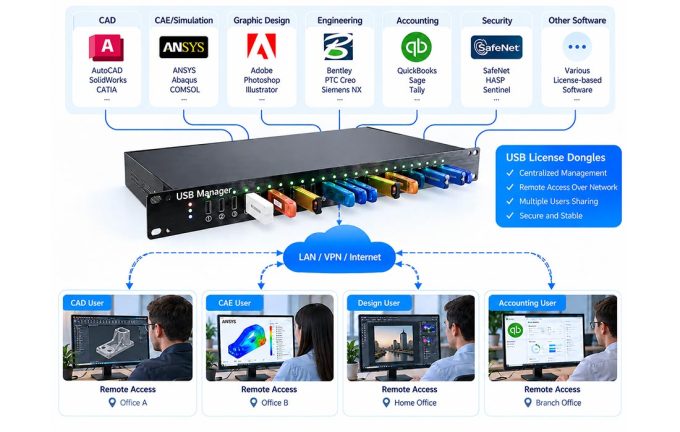
Centralized USB License Dongle Management with USB Over IP
USB Manager connects compatible software license dongles to a dedicated hardware USB Server. Authorized computers access assigned dongles over the network, allowing supported applications to recognize them through the required USB drivers.
IT administrators can organize devices centrally and control who is permitted to connect, reducing the need to move physical license keys between workstations.
- Centralize multiple USB license dongles
- Connect over LAN or suitable VPN networks
- Manage authorized users and USB device access
- Support remote offices and distributed teams
PHYSICAL USB LICENSE KEYS
NETWORK ACCESS
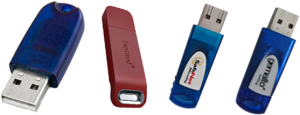
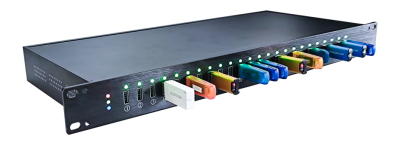
USB Manager Hardware USB Server
—— LAN / VPN / IP Network ——
Diagram illustrates sequential authorized access to compatible USB license devices, not simultaneous multi-user use of one dongle.
How to Share a USB Dongle Over Ethernet or IP Networks
USB Manager uses dedicated USB over IP hardware to make compatible license dongles accessible from authorized computers across a local network or a suitable VPN connection. This approach is also described as USB dongle over Ethernet or remote USB dongle access.
01
Connect the USB License Dongle
Insert the physical license key into a USB port on the hardware USB Server at a controlled location.
02
Connect the Server to Your Network
Connect the USB Server to the LAN and configure authorized access over the required network or VPN.
03
Access the Dongle from a Remote PC
Use the USB client on a supported computer to connect to the assigned device. The protected software still needs its compatible drivers and a valid license.
Important: USB over network access does not increase licensed user counts or bypass vendor restrictions. Device behavior depends on the dongle, software protection mechanism, drivers and network conditions.
Dedicated USB Hardware
USB device connectivity without a general-purpose host PC.
Centralized Administration
Organize multiple dongles and manage permitted access.
Flexible Network Deployment
Support compatible LAN, VPN and remote office workflows.
Better Control of Valuable Software License Keys
Make physical license resources easier to access, administer and protect while respecting each software vendor’s licensing requirements.
01
Improve License Availability
Make physical USB license keys accessible to authorized users without repeatedly relocating the dongles.
02
Support Distributed Teams
Enable approved access from remote offices and networked workstations.
03
Protect Valuable USB Keys
Store license dongles in a controlled equipment area instead of moving them between desks.
03
Simplify IT Administration
Manage multiple dongles and access permissions from a centralized USB management platform.
USB License Dongle Applications
Designed for businesses that rely on physical USB-based authorization devices for professional software.
CAD / CAM / CAE
Engineering design, manufacturing and simulation software that uses USB hardware licensing.
HASP & Protection Keys
Compatible HASP and other USB-based software protection dongles.
Industrial Software
Machine programming, specialized industrial tools and licensed production applications.
Professional Applications
Enterprise applications that require a physical USB authorization device.
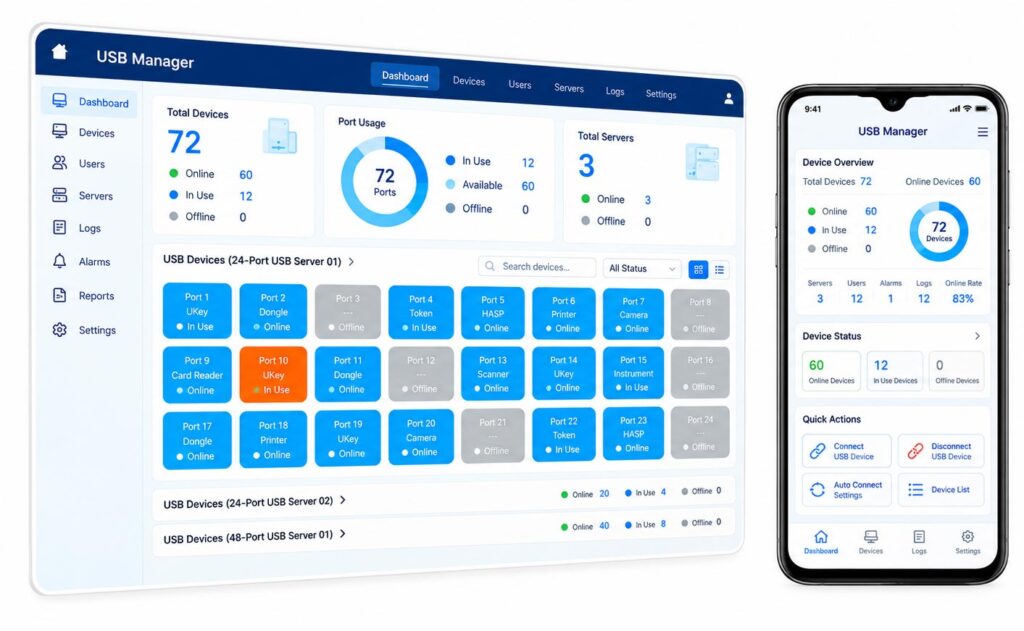
Dedicated Hardware, Centralized Control
Compared with USB-sharing software hosted on a general-purpose PC, a hardware USB Server provides dedicated network-connected USB ports and a centralized management approach.
- Dedicated hardware USB over IP connectivity
- Centralized USB device visibility
- User and device access permissions
- Scalable deployment across multiple USB Servers
Interface image is an illustrative marketing mockup. Confirm model-specific features and dongle compatibility before deployment.
USB License Dongle Sharing FAQ
What is a USB license dongle?
A USB license dongle is a physical hardware key used by software vendors to authenticate or activate licensed software.
Can USB license dongles be shared over a network?
USB Manager can make compatible USB license dongles accessible over an IP network to authorized computers. Whether and how a license may be shared depends on the software vendor’s licensing terms.
Does USB Manager support HASP dongles?
Many USB-based license keys, including certain HASP-type dongles, may be supported. Compatibility should be verified with the exact dongle, driver, protected application and operating system.
Can multiple users use the same dongle simultaneously?
USB access can be assigned to different authorized users, typically one active connection at a time for a given device. Concurrent software usage depends on the dongle and license terms.
What is the difference between software USB sharing and a hardware USB Server?
Software-based sharing generally relies on a host computer with USB ports. A dedicated hardware USB Server provides network-accessible USB ports without using a general-purpose PC as the USB host.
What information is needed for a compatibility check?
Please share the dongle brand/model, protected software, operating system, driver version and expected network environment. We can then review the proposed deployment.
How do I share a USB license dongle over Ethernet?
Connect a compatible USB dongle to a hardware USB Server, connect the server to your network, then use the supported USB client on an authorized computer to access the assigned dongle. Confirm that the software vendor permits this use.
Can I use a USB license dongle on a remote PC or virtual machine?
Some dongles can be redirected to supported remote PCs or virtual machines through USB over IP. Check the hypervisor, guest operating system, dongle driver and protected application before deployment.
Is USB dongle over Ethernet the same as USB over IP?
In this context, both describe accessing a USB device through a network connection. The hardware USB Server connects physical USB ports to the network; a client connects to an authorized device remotely.
Find the Right USB Server for Your License Dongles
Tell us your dongle models, protected software, operating systems and network requirements. Our team can help you assess compatibility and plan a suitable USB over IP deployment.
