
VMware USB Passthrough & Hyper-V USB Over IP
Remote USB Access for Virtual Machines, ESXi Hosts and Virtualized Workloads
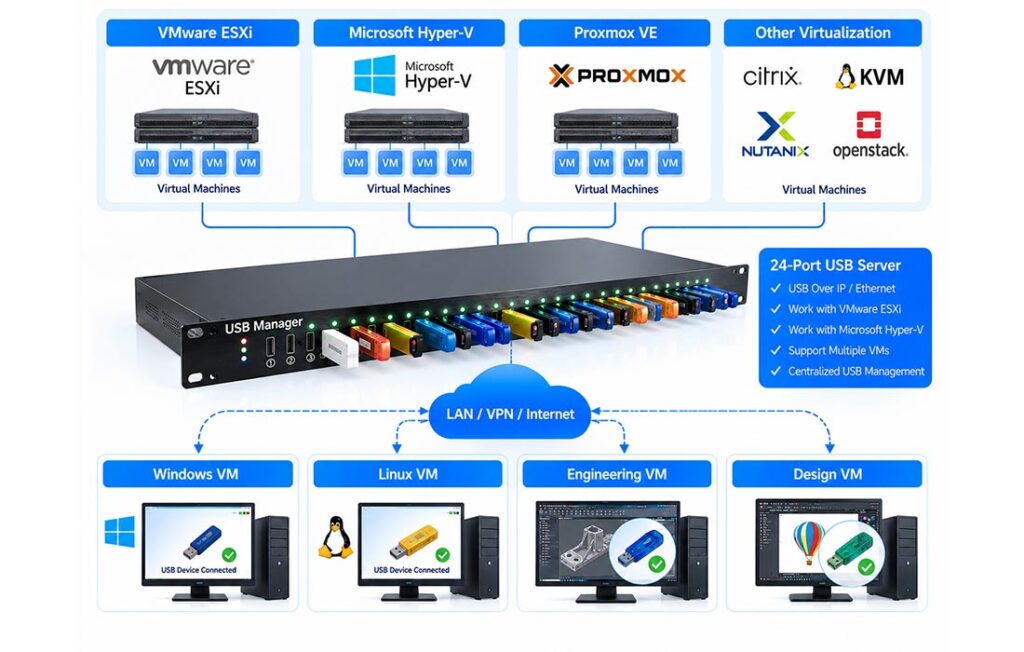
Give supported VMware and Microsoft Hyper-V virtual machines access to physical USB license dongles, security keys, smart-card readers and industrial devices — without plugging them into each virtualization host. USB Manager combines a dedicated hardware USB Server with USB client software for controlled USB over IP connections.
Why USB Access Is Difficult in Virtualized Environments
USB Devices Are Tied to Physical Hosts
A virtual machine may run far from the USB port holding a required license key, smart card or instrument.
Local USB Passthrough Has Constraints
Hypervisor USB passthrough typically depends on the host, guest configuration and physical device location.
Distributed Infrastructure
Remote offices, data centers and cloud-hosted workloads complicate access to USB devices.
Growing IT Administration
Moving devices and maintaining access across multiple virtual machines adds operational overhead.
How USB Over IP Works for VMware & Hyper-V
1 · Physical USB Devices
License dongles, security keys, smart-card readers and compatible industrial USB equipment
→
2 · Hardware USB Server
Centralized USB ports connected to your Ethernet / IP network
→
3 · Virtual Machine
USB client inside a supported guest OS connects to an authorized remote USB device
This is network-based USB redirection, not native hypervisor host passthrough. Install the supported USB client where the device must appear, subject to guest OS, network and device compatibility. A network path alone does not guarantee support for every USB device or cloud VM.
How to Connect a USB Device to a Virtual Machine Over Ethernet
01
Connect the USB Device
Insert a compatible USB license dongle or other USB peripheral into the hardware USB Server at a controlled location.
02
Connect the Server to Your Network
Use the enterprise LAN or an appropriately secured VPN / routed network to make the USB Server reachable.
03
Access It from a Supported VM
Install and configure the supported USB client inside the guest environment, then connect to the assigned device.
Verify the guest OS, hypervisor networking, USB driver, device model, security policy and software vendor licensing before production rollout.
VMware USB Passthrough and Hyper-V USB Access
When a USB device is not conveniently attached to an ESXi host or Hyper-V machine, a dedicated hardware USB Server can provide an alternative USB over network path to compatible guest systems.
- VMware ESXi / vSphere: network-based remote USB access for supported virtual machines
- VMware Workstation: access to compatible network-attached USB devices
- Microsoft Hyper-V: USB over IP access where the guest environment supports the USB client
- Remote and cloud VMs: possible where routing, permissions and platform restrictions allow
Platform names identify deployment scenarios, not official certifications or blanket compatibility guarantees.

Benefits of Hardware USB Over IP for Virtualization
01
Flexible VM Placement
Access supported USB devices without keeping each device next to the physical hypervisor host.
02
Centralized USB Device Management
Keep dongles and authentication devices in a controlled location and manage who can connect.
03
Less Manual USB Handling
Reduce repeated device movement and host-side plugging for eligible workflows.
04
Support Distributed Workloads
Connect eligible VMs across offices, private networks and remote infrastructure.
Typical USB Passthrough & Remote USB Applications
USB License Dongles in VMs
Access compatible CAD/CAM, engineering and professional software authorization dongles from virtual machines, subject to licensing.
Hyper-V USB Security Devices
Make supported smart-card readers, authentication keys and USB tokens available to authorized guest systems.
Remote Data Center Workloads
Keep USB devices at a managed site while workloads operate on supported remote or private-cloud VMs.
Industrial and Test Software
Connect compatible USB measurement and industrial devices to software running in a virtualized environment.
USB Passthrough vs. USB Over IP: What Is the Difference?
| Consideration | Native USB Passthrough | Hardware USB Over IP |
|---|---|---|
| Device location | Usually connected to a host or locally supported path | Connected to a network-attached hardware USB Server |
| Access path | Hypervisor or host USB assignment | IP network plus compatible USB client |
| Remote deployment | Depends on host and hypervisor features | Can span LAN/VPN when network and client support permit |
| Administration | Host/VM-specific configuration | Centralized USB device and access management |
| Compatibility | Hypervisor, guest and USB-device dependent | USB client, guest OS, driver and network dependent |
VMware & Hyper-V USB Access FAQ
What is VMware USB passthrough?
VMware USB passthrough assigns a physical USB device to a virtual machine using supported host or hypervisor functionality. USB Manager offers a separate network-based USB over IP approach for compatible guests.
How can I access a USB dongle from a VMware ESXi virtual machine?
Connect the dongle to a hardware USB Server, ensure network reachability, and configure a supported USB client inside the guest OS. Test the exact dongle and software license conditions.
Does USB Manager support Hyper-V USB passthrough?
USB Manager provides a USB over IP access approach for supported Hyper-V guest environments. It is not the same as native Hyper-V USB passthrough; confirm guest OS and client compatibility.
Can a virtual machine use USB over Ethernet?
Yes, a compatible guest can access a USB device connected to a network USB Server over an IP network. Drivers, security settings and USB-device behavior still need verification.
What is the difference between USB redirector and USB passthrough?
USB redirector usually refers to forwarding a USB device through a network or remote session. USB passthrough often refers to assigning a physical USB device to a VM through a hypervisor. Implementations vary.
Can I connect USB devices to a cloud VM?
Some cloud or remote VM deployments may be feasible when the provider permits the required client, USB drivers, network connectivity and security policies. Verify with your exact environment.
Can multiple VMs use the same USB license dongle at once?
Typically a single USB device is connected to one active client at a time. Any concurrent license use is governed by the device and software vendor license terms.
What information is needed to check compatibility?
Share the hypervisor and version, guest operating system, USB device brand/model, driver, protected application and expected LAN/VPN/cloud network topology.
Does this fix every “USB not working on VMware” problem?
No. USB failures can have several causes, including drivers, host settings, unsupported devices and guest configuration. USB over IP is an alternative architecture, not a universal repair for VMware USB issues.
Connect USB Devices to Your VMs with Confidence
Tell us your VMware or Hyper-V platform, guest OS, USB device models and network topology. Our team can help assess a suitable hardware USB over IP deployment.
