
Usually, IT administrators struggle to grant external contractors safe peripheral access. First, vendors and temporary staff need brief connections to specialized licensing dongles or diagnostic probes. Next, standing permanent permissions linger long after project contracts expire. Then, a dedicated USB Server helps. Plus, hardware boxes beat weak apps. So, we explore temporary entitlements, automatic expiry, and scarce-device scheduling. Thus, your contractor access workflow wins big. Here, smart gear stops standing-privilege panic.
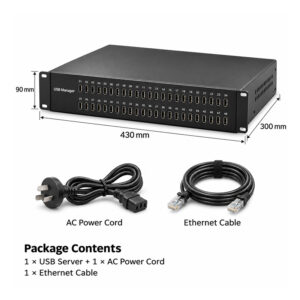 Now, stop granting permanent, unmonitored USB access to temporary contractors and external vendors. First, USB Manager provides top safety. Next, it bridges distant tools securely. Then, deep logs track every click. Plus, setup takes only five minutes. So, global IT leaders trust it. Thus, you gain absolute firm control. Finally, heavy metal stops hot dust.
Fact 1: Temporary Entitlements and Just-in-Time USB Session Time Limits
Clearly, granting permanent peripheral access to temporary personnel creates unnecessary security debt. First, IT admins configure a strict usb session time limit before onboarding external contractors. Next, administrators issue just-in-time entitlements scoped strictly to a project window—such as four hours or three business days. Then, contractors only mount the exact physical port required for their assigned maintenance task. Plus, access grants stay bound to individual domain or temporary guest accounts rather than shared passwords. So, vendors finish their work without ever holding open-ended hardware access. Thus, time-bound entitlements enforce true least-privilege access across temporary teams. Indeed, network sharing brings true joy.Fact 2: Pure Software Drops Fast
Actually, cheap apps drop links fast. First, weak programs lose license data. Next, host computers freeze during tasks. Then, bad codes confuse normal staff. Plus, virtual networks lose remote ports. So, hardware servers replace cheap software. Thus, standalone gear keeps links alive. Truly, metal boxes beat weak apps.Fact 3: Supporting USB over IP
Naturally, fast networks carry digital bytes. First, physical hubs convert tool signals. Next, USB over IP moves data. Then, smart routers move packets well. Plus, distant software unpacks pure facts. So, remote computers see real tools. Thus, smart routing stops data jams. Clearly, gigabit speeds clear heavy traffic.Fact 4: Automatic Expiration and Idle Session Reclaim
Sometimes, manual offboarding tickets sit in IT queues for weeks after a contractor leaves. First, enterprise appliances eliminate human forgetfulness through hardware-enforced auto-expiration. Next, when a preset session clock reaches zero, the server cleanly terminates the connection and revokes port eligibility automatically. Then, idle-timeout rules detect inactive sessions when users step away or drop off VPN links. Plus, administrators receive automated syslog notifications confirming session closure and port availability. So, forgotten contractor accounts never retain silent backdoor access to sensitive tokens. Thus, automatic expiry removes manual revocation bottlenecks from busy IT desks. Here, automated clocks beat manual cleanup checklists.Fact 5: Operational Use Cases for Scarce Shared USB Devices
Often, organizations own only a handful of expensive hardware licenses or lab fixtures. First, CAD engineering dongles, regulatory compliance smartcards, and hardware debuggers cost thousands per unit. Next, one contractor leaving a session mounted overnight blocks an entire morning shift of internal engineers. Then, time-limited sessions ensure scarce peripherals rotate fairly across distributed teams and time zones. Plus, scheduled reservation windows align vendor maintenance slots with off-peak production hours. So, companies maximize hardware utilization without buying duplicate physical dongles. Thus, automated session limits solve both security exposure and operational bottlenecks simultaneously. Indeed, fair time-slicing multiplies scarce hardware ROI.Fact 6: Centralizing Server Room Security
Naturally, scattered keys invite bad thieves. First, cheap hubs sit openly everywhere. Next, sneaky guests steal tiny tools. Then, central vaults lock everything inside. Plus, heavy metal stops physical hits. So, firm assets stay completely secure. Thus, locked rooms protect vital cash. Truly, physical safety wins daily tests.Fact 7: Deep Audit Log Tracking
Clearly, firm bosses track hardware usage. First, basic hubs hide daily actions. Next, deep logs record every click. Then, exact login times show truths. Plus, clear reports clear all doubts. So, meeting strict compliance feels easy. Thus, passing strict audits feels fast. Here, clean logs save massive stress.Fact 8: Strict User Access Roles
Actually, normal staff make huge errors. First, open ports invite huge risks. Next, smart admins set exact roles. Then, unknown guests face locked doors. Plus, verified staff access assigned ports. So, role checks stop daily panics. Thus, firm data stays fully clean. Also, role limits protect company wealth.Fact 9: Stable Power Flow Rules
Often, sudden drops kill active tasks. First, weak voltage halts hardware chips. Next, power drops crash vital jobs. Then, smart servers deliver steady watts. Plus, dedicated supplies feed every port. So, critical dongles remain perfectly active. Hence, steady juice protects firm gear. Indeed, strong power beats cheap hubs.Fact 10: Scaling Global Branch Offices
Sometimes, growing firms expand global branches. First, tiny hubs fail daily scale. Next, ripping old wires costs cash. Then, massive racks add many ports. Plus, scalable hubs plug very fast. So, future growth feels quite easy. Thus, smart bosses plan ahead daily. Naturally, adding gear saves much stress.Fact 11: Real Time Alert Bells
Clearly, sudden drops cause big panics. First, dead links hide very well. Next, late fixes waste firm money. Then, smart servers send alert bells. Plus, red flags warn IT staff. So, remote admins fix bugs fast. Thus, instant alerts save daily cash. Here, quick news stops system crashes.Fact 12: Quick IT Deployment Steps
Usually, tricky codes confuse normal staff. First, complex software wastes IT hours. Next, real hardware plugs instantly today. Then, visual screens guide daily users. Plus, simple steps save team energy. So, total beginners deploy things fast. Thus, quick setups bring true joy. Here, easy rules beat complex codes.Fact 13: Stopping Host PC Crashes
Clearly, standard computers sleep quite often. First, sleeping hosts drop network links. Next, distant users lose active sessions. Then, dedicated hardware runs all night. Plus, industrial servers never ever sleep. So, global teams work perfectly well. Thus, standalone gear provides true freedom. Also, continuous uptime boosts firm speed.Fact 14: Reviewing Total Firm Value
Sometimes, IT budgets stay very tight. First, lost connections waste firm money. Next, dropping links kill daily output. Then, smart sharing saves huge cash. Plus, long life saves big funds. So, one big box pays off. Thus, firm wealth grows very fast. Truly, smart buys bring high value.Why Choose USB Manager?
Now, stop granting permanent, unmonitored USB access to temporary contractors and external vendors. First, USB Manager provides top safety. Next, it bridges distant tools securely. Then, deep logs track every click. Plus, setup takes only five minutes. So, global IT leaders trust it. Thus, you gain absolute firm control. Finally, heavy metal stops hot dust.
