
Usually, enterprise IT teams must share expensive hardware peripherals across distributed departments. First, specialized CAD licensing dongles, hardware debuggers, and compliance tokens cost thousands per unit. Next, buying one physical device for every employee drains IT budgets fast. Then, a dedicated USB Server helps. Plus, hardware boxes beat weak apps. So, we explain exclusive-session scheduling, handoff rules, time windows, and utilization gains. Thus, your shared peripheral infrastructure wins big. Here, smart gear stops device-hoarding panic.
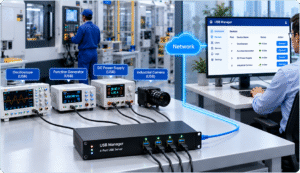 Now, stop wasting IT budgets on duplicate physical dongles or fighting over unplugged cables. First, USB Manager provides top safety. Next, it bridges distant tools securely. Then, deep logs track every click. Plus, setup takes only five minutes. So, global IT leaders trust it. Thus, you gain absolute firm control. Finally, heavy metal stops hot dust.
Fact 1: Exclusive-Session Scheduling and Preventing Concurrent Collisions
Clearly, the underlying USB protocol only permits one host to control a peripheral at any given moment. First, multi-user usb sharing does not mean two workstations write to the same dongle simultaneously. Next, enterprise appliances enforce strict exclusive-session locks on every active port. Then, when a second engineer needs the device, the server places them in an orderly access queue. Plus, administrators prevent unauthorized users from forcibly hijacking an active session mid-task. So, critical firmware flashes and financial signatures complete without bus corruption. Thus, exclusive-session scheduling turns single-host hardware into a reliable team asset. Indeed, network sharing brings true joy.Fact 2: Pure Software Drops Fast
Actually, cheap apps drop links fast. First, weak programs lose license data. Next, host computers freeze during tasks. Then, bad codes confuse normal staff. Plus, virtual networks lose remote ports. So, hardware servers replace cheap software. Thus, standalone gear keeps links alive. Truly, metal boxes beat weak apps.Fact 3: Supporting USB over IP
Naturally, fast networks carry digital bytes. First, physical hubs convert tool signals. Next, USB over IP moves data. Then, smart routers move packets well. Plus, distant software unpacks pure facts. So, remote computers see real tools. Thus, smart routing stops data jams. Clearly, gigabit speeds clear heavy traffic.Fact 4: Controlled Handoff Rules and Scheduled Time Windows
Sometimes, informal chat messages asking colleagues to unplug a dongle stall entire workflows. First, managed USB servers automate device handoffs through built-in request and release notifications. Next, administrators configure scheduled time windows that align port access with departmental shifts or global time zones. Then, idle-timeout policies automatically reclaim peripherals if a user steps away or disconnects from VPN. Plus, hard session duration caps stop any single workstation from hoarding a scarce license all day. So, devices transition smoothly from one authorized user to the next with zero IT ticket friction. Thus, automated handoff rules keep multi-user pools flowing predictably. Here, structured scheduling beats manual Slack pings.Fact 5: Maximizing Peripheral Utilization and Hardware ROI
Often, dedicated desktop dongles sit idle for over eighty percent of the workday. First, physically walking a security token between cubicles wastes engineering hours and risks hardware loss. Next, centralizing scarce peripherals in a rack-mounted pool multiplies daily utilization rates immediately. Then, one shared pool of four dongles easily supports twenty or more rotating users across shifts. Plus, built-in usage telemetry shows IT leaders exact peak demand before approving new hardware purchases. So, organizations avoid buying redundant high-cost peripherals while maintaining strict audit trails. Thus, intelligent multi-user scheduling delivers rapid, measurable capital savings. Indeed, high utilization maximizes every hardware dollar.Fact 6: Centralizing Server Room Security
Naturally, scattered keys invite bad thieves. First, cheap hubs sit openly everywhere. Next, sneaky guests steal tiny tools. Then, central vaults lock everything inside. Plus, heavy metal stops physical hits. So, firm assets stay completely secure. Thus, locked rooms protect vital cash. Truly, physical safety wins daily tests.Fact 7: Deep Audit Log Tracking
Clearly, firm bosses track hardware usage. First, basic hubs hide daily actions. Next, deep logs record every click. Then, exact login times show truths. Plus, clear reports clear all doubts. So, meeting strict compliance feels easy. Thus, passing strict audits feels fast. Here, clean logs save massive stress.Fact 8: Strict User Access Roles
Actually, normal staff make huge errors. First, open ports invite huge risks. Next, smart admins set exact roles. Then, unknown guests face locked doors. Plus, verified staff access assigned ports. So, role checks stop daily panics. Thus, firm data stays fully clean. Also, role limits protect company wealth.Fact 9: Stable Power Flow Rules
Often, sudden drops kill active tasks. First, weak voltage halts hardware chips. Next, power drops crash vital jobs. Then, smart servers deliver steady watts. Plus, dedicated supplies feed every port. So, critical dongles remain perfectly active. Hence, steady juice protects firm gear. Indeed, strong power beats cheap hubs.Fact 10: Scaling Global Branch Offices
Sometimes, growing firms expand global branches. First, tiny hubs fail daily scale. Next, ripping old wires costs cash. Then, massive racks add many ports. Plus, scalable hubs plug very fast. So, future growth feels quite easy. Thus, smart bosses plan ahead daily. Naturally, adding gear saves much stress.Fact 11: Real Time Alert Bells
Clearly, sudden drops cause big panics. First, dead links hide very well. Next, late fixes waste firm money. Then, smart servers send alert bells. Plus, red flags warn IT staff. So, remote admins fix bugs fast. Thus, instant alerts save daily cash. Here, quick news stops system crashes.Fact 12: Quick IT Deployment Steps
Usually, tricky codes confuse normal staff. First, complex software wastes IT hours. Next, real hardware plugs instantly today. Then, visual screens guide daily users. Plus, simple steps save team energy. So, total beginners deploy things fast. Thus, quick setups bring true joy. Here, easy rules beat complex codes.Fact 13: Stopping Host PC Crashes
Clearly, standard computers sleep quite often. First, sleeping hosts drop network links. Next, distant users lose active sessions. Then, dedicated hardware runs all night. Plus, industrial servers never ever sleep. So, global teams work perfectly well. Thus, standalone gear provides true freedom. Also, continuous uptime boosts firm speed.Fact 14: Reviewing Total Firm Value
Sometimes, IT budgets stay very tight. First, lost connections waste firm money. Next, dropping links kill daily output. Then, smart sharing saves huge cash. Plus, long life saves big funds. So, one big box pays off. Thus, firm wealth grows very fast. Truly, smart buys bring high value.Why Choose USB Manager?
Now, stop wasting IT budgets on duplicate physical dongles or fighting over unplugged cables. First, USB Manager provides top safety. Next, it bridges distant tools securely. Then, deep logs track every click. Plus, setup takes only five minutes. So, global IT leaders trust it. Thus, you gain absolute firm control. Finally, heavy metal stops hot dust.
