
Usually, security administrators rely on corporate VPNs for remote infrastructure connectivity. First, distributed staff need access to office smartcards and ERP license dongles. Next, assuming the VPN tunnel solves all peripheral security risks creates blind spots. Then, a dedicated USB Server helps. Plus, hardware boxes beat weak apps. So, we separate tunnel protection from device-level control. Thus, your remote security architecture wins big. Here, smart gear stops insider access panic.
Fact 1: What the VPN Actually Protects: Layer 3 Tunnel Confidentiality
Clearly, enterprise VPN gateways secure packets crossing untrusted public networks. First, IPsec or WireGuard encrypts traffic between remote endpoints and office firewalls. Next, strong tunnel authentication verifies user credentials before granting internal IP reachability. Then, external eavesdroppers cannot inspect raw USB encapsulation payloads in transit. Plus, VPN concentrators block unauthenticated public internet port scans. So, the VPN secures the external transport pipe across public WAN links. Thus, network tunnel confidentiality defends against external man-in-the-middle interception. Indeed, network sharing brings true joy.
Fact 2: Pure Software Drops Fast
Actually, cheap apps drop links fast. First, weak programs lose license data. Next, host computers freeze during tasks. Then, bad codes confuse normal staff. Plus, virtual networks lose remote ports. So, hardware servers replace cheap software. Thus, standalone gear keeps links alive. Truly, metal boxes beat weak apps.
Fact 3: Supporting USB over IP
Naturally, fast networks carry digital bytes. First, physical hubs convert tool signals. Next, USB over IP moves data. Then, smart routers move packets well. Plus, distant software unpacks pure facts. So, remote computers see real tools. Thus, smart routing stops data jams. Clearly, gigabit speeds clear heavy traffic.
Fact 4: What the VPN Does Not Control: Port-Level Identity and RBAC Permissions
Sometimes, granting internal subnet access exposes every connected peripheral globally. First, a VPN gateway evaluates network routing rather than USB port ownership. Next, once inside the tunnel, any remote client can scan peripheral servers. Then, unmanaged network hubs allow unauthorized users to claim executive smartcards. Plus, dedicated USB servers enforce granular Role-Based Access Control (RBAC). So, administrators bind specific physical ports directly to Active Directory groups. Thus, port-level identity permissions prevent unauthorized lateral peripheral access. Here, granular RBAC locks down individual hardware ports.
Fact 5: Session Lifecycle Governance, Lease Timeouts, and Audit Trails
Often, remote VPN sessions introduce unique operational and compliance liabilities. First, VPN logs only record tunnel login times and virtual IP addresses. Next, security auditors cannot tell which user mounted a specific banking token. Then, dropped home Wi-Fi sessions leave remote USB ports locked indefinitely. Plus, managed USB servers enforce session lease timers and immutable syslog trails. So, idle peripherals release automatically and every mount logs to SIEM platforms. Thus, application-layer session governance closes forensic and availability gaps. Indeed, active session control eliminates abandoned port deadlocks.
Fact 6: Centralizing Server Room Security
Naturally, scattered keys invite bad thieves. First, cheap hubs sit openly everywhere. Next, sneaky guests steal tiny tools. Then, central vaults lock everything inside. Plus, heavy metal stops physical hits. So, firm assets stay completely secure. Thus, locked rooms protect vital cash. Truly, physical safety wins daily tests.
Fact 7: Deep Audit Log Tracking
Clearly, firm bosses track hardware usage. First, basic hubs hide daily actions. Next, deep logs record every click. Then, exact login times show truths. Plus, clear reports clear all doubts. So, meeting strict compliance feels easy. Thus, passing strict audits feels fast. Here, clean logs save massive stress.
Fact 8: Strict User Access Roles
Actually, normal staff make huge errors. First, open ports invite huge risks. Next, smart admins set exact roles. Then, unknown guests face locked doors. Plus, verified staff access assigned ports. So, role checks stop daily panics. Thus, firm data stays fully clean. Also, role limits protect company wealth.
Fact 9: Stable Power Flow Rules
Often, sudden drops kill active tasks. First, weak voltage halts hardware chips. Next, power drops crash vital jobs. Then, smart servers deliver steady watts. Plus, dedicated supplies feed every port. So, critical dongles remain perfectly active. Hence, steady juice protects firm gear. Indeed, strong power beats cheap hubs.
Fact 10: Scaling Global Branch Offices
Sometimes, growing firms expand global branches. First, tiny hubs fail daily scale. Next, ripping old wires costs cash. Then, massive racks add many ports. Plus, scalable hubs plug very fast. So, future growth feels quite easy. Thus, smart bosses plan ahead daily. Naturally, adding gear saves much stress.
Fact 11: Real Time Alert Bells
Clearly, sudden drops cause big panics. First, dead links hide very well. Next, late fixes waste firm money. Then, smart servers send alert bells. Plus, red flags warn IT staff. So, remote admins fix bugs fast. Thus, instant alerts save daily cash. Here, quick news stops system crashes.
Fact 12: Quick IT Deployment Steps
Usually, tricky codes confuse normal staff. First, complex software wastes IT hours. Next, real hardware plugs instantly today. Then, visual screens guide daily users. Plus, simple steps save team energy. So, total beginners deploy things fast. Thus, quick setups bring true joy. Here, easy rules beat complex codes.
Fact 13: Stopping Host PC Crashes
Clearly, standard computers sleep quite often. First, sleeping hosts drop network links. Next, distant users lose active sessions. Then, dedicated hardware runs all night. Plus, industrial servers never ever sleep. So, global teams work perfectly well. Thus, standalone gear provides true freedom. Also, continuous uptime boosts firm speed.
Fact 14: Reviewing Total Firm Value
Sometimes, IT budgets stay very tight. First, lost connections waste firm money. Next, dropping links kill daily output. Then, smart sharing saves huge cash. Plus, long life saves big funds. So, one big box pays off. Thus, firm wealth grows very fast. Truly, smart buys bring high value.
Why Choose USB Manager?
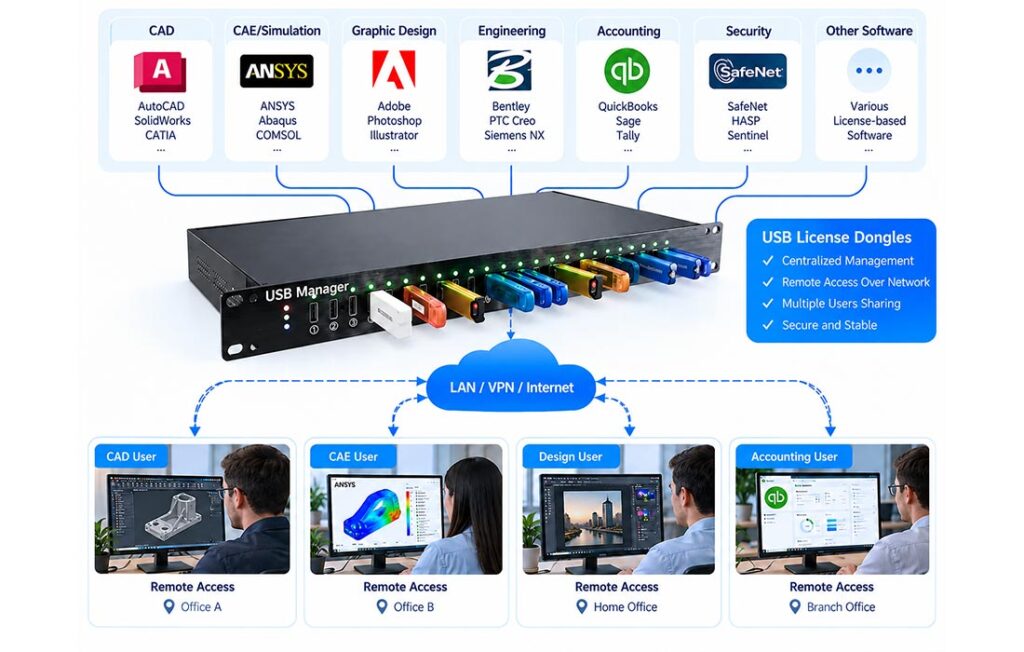
Now, stop assuming a corporate VPN tunnel alone secures sensitive USB peripherals. First, USB Manager provides top safety. Next, it bridges distant tools securely. Then, deep logs track every click. Plus, setup takes only five minutes. So, global IT leaders trust it. Thus, you gain absolute firm control. Finally, heavy metal stops hot dust.
Best Final Pick
Overall, smart buying saves firm cash. Sadly, cheap apps ruin daily tasks. But, good hardware runs almost forever. Then, your daily jobs succeed fully. Plus, smooth sharing brings true joy. So, upgrade your office gear today. Thus, remote links stay perfectly safe. Indeed, proper tools boost firm speed.
Frequently Asked Questions (FAQ)
What security risks remain when accessing USB devices over a VPN? While a VPN encrypts traffic across the public internet, it does not restrict which physical USB ports a connected user can mount once inside the corporate network. Without port-level permissions on the USB server, any VPN user could claim unauthorized licensing dongles or smartcards.
How does a USB server enforce permissions for VPN users? Enterprise USB servers integrate with Active Directory or LDAP, allowing security administrators to map individual USB ports to specific user roles, enforce end-to-end TLS encryption inside the LAN, and log every device connection to SIEM tools.
Are hardware servers truly safe here? Yes, hardware provides true absolute safety. First, metal boxes skip host limits. Next, central vaults lock network ports. Then, deep logs track every user.
